Hi, welcome !. This is a beginner course of system managers linux. I hope you enjoy it. My name's José María Tomás. Each entry of this blog help you to improve your knowleges about how to managing systems linux. Linux is an open code operating system and free distribution, inspired in the MINIX operating system (a little UNIX). It was written by Linus Torvalds and developed with the help of thousands of programmers. Linux is multitask and multiuser. There're a lot of amount of Linux distributions: Red Hat, Suse, Mandrake, Debian, Ubuntu ... GNU/Linux Let's start !
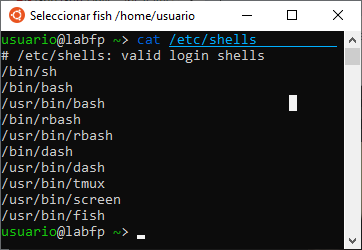
Linux Shell The shell is an interface for you to interact with your operating system (OS). As you type commands into the shell, it's responsible for interpreting those commands. Operations like copying files, piping, listing files are all within a shell's remit. Several Linux shells are available. To find out all the shells that are available on your system, open the terminal and type: cat /etc/shells To find out what shell you're currently using type: echo $0 Other shells are tsch, fish, KornShell, and Z Shell. How to change the shell to use another one? If you want to use a different shell, you can simply type its name and you’ll be logged into the new shell. For example, if you install fish (sudo apt install fish) and want to use it, you can simply use: ...


Comentarios
Publicar un comentario